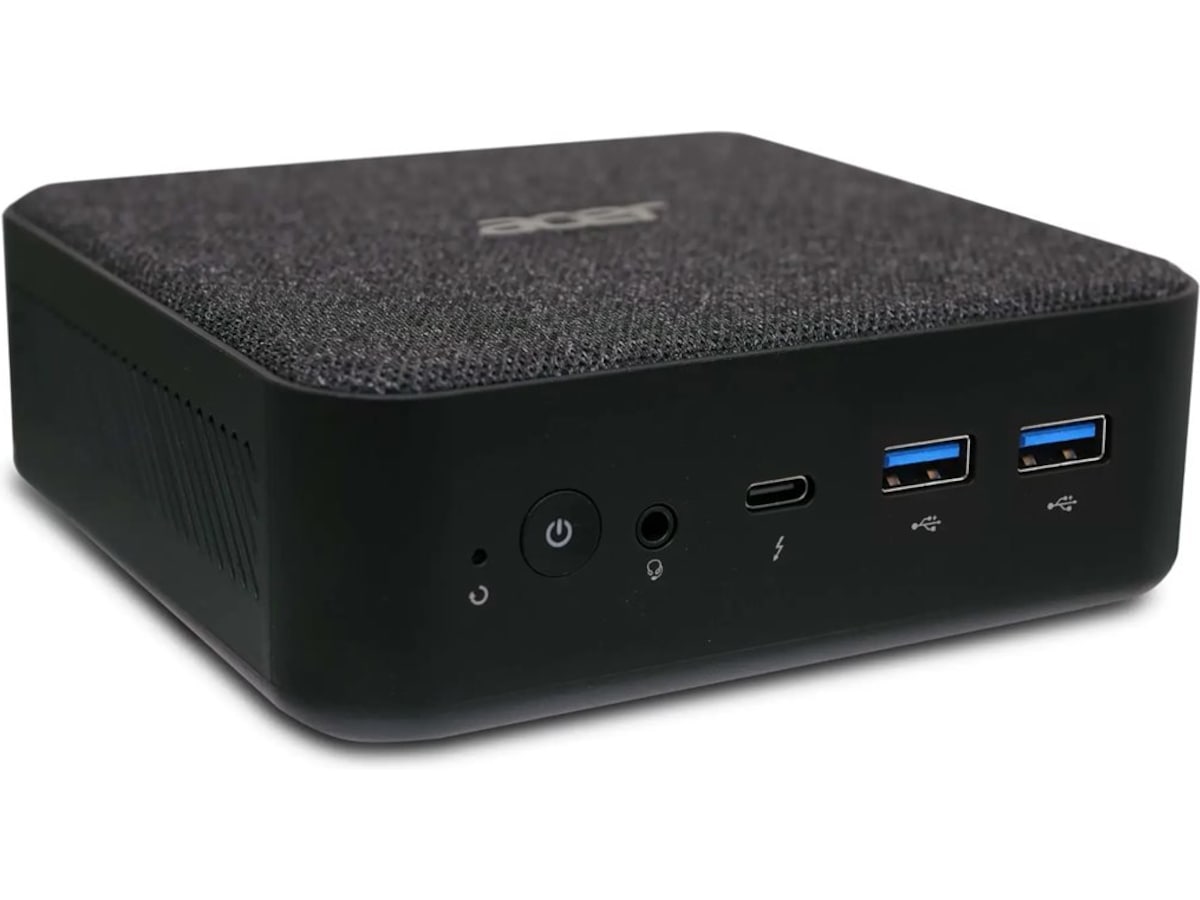
Looking for a simple mini device that I can plug into TV for streaming stuff via browser/jellyfin and similar, with hdmi and control via bluetooth keyboard/mouse. What do you guys recommend?
Would this be powerful enough for example? https://www.komplett.no/product/1323029/pc-tilbehoer/stasjonaer-pc/acer-revo-box-mini-pc
Your old laptop & a generic bluetooth keyboard/mouse combo unit.
That is my setup. :)
Are there any better options for keyboard trackpad combo than the Logitech k400 yet?
Looks at lap
Logitech K400 still kicking it! (No clue if there is a better one, but it’s going to be hard to beat the classic)
I’ve been clinging to my 10 year old Logitech diNovo Mini, but when this thing kicks the bucket dunno how I’m gonna replace it. Trackpad has been pretty good, and I like the fact that it turns off and is protected when the clamshell is closed so I don’t accidentally press stuff when it gets lost in the couch. We really need an open source mini keyboard so people can make their own and customize buttons, etc.

The K400 is everywhere. I have one; my friend has one - I can mention it to fellow geeks, and everyone knows what it is.
Cool, using this setup now.
Thinking of ways to make it more friendly for my SO and guests coming to visit or babysit etc, who are not used to linux (gnome). Any tips there?
Top of mind is auto open browser on startup with fixed tabs for relevant streaming services. But could also be a simple wrapper of some kind, with UI similar to kodi, plex, jellyfin etc - but for accessing content on web.
The problem with a wrapper as you put it, specifically one running on Linux, is DRM. The only way I know of to achieve the desired Widevine encryption level is running the service in a tab in Chrome. Not any other browser, not even Chromium.
Of course you could just bypass all that nonsense by pirating your media, and have a nice easy interface consolidating titles from all streamers - even retaining a network badge so they can see where a given popular show is airing - like what I’ve set up in Kodi for myself as well as boomer relatives.
Other than that I’d recommend Flirc for input via remote (or LIRC if you have a supported remote already and don’t mind some extra configuration)
i use stremio, nice and easy setup. i pay for a debrid service with usenet to get a better experience though.
I use a Raspberry Pi 5 with LibreELEC
same here, with NVMe-Board
That is pretty expensive nowadays, if OP wants to go that expensive, getting a mini PC with the latest intel N150. The pi 5 doesn’t even have hardware AV1 decoding. By the time you have all of the pi accessories, it is not much of a price difference, but defi itely a performance difference.
Plus you get benefits like actual storage instead of a separately bought SD card, more RAM, 2.5G ethernet, and HDMI2.1 & USB–C displayport.
Then you slap Linux on it (and also hope that plasma bigscreen is a success in the near future) and you have a very reliable 4K HTPC that can decode anything you throw at it. It has enough horsepower to be a home server at the same time, unlike a pi while also having just a bit higher idle power usage (2W or so).
Thx for the tip!
Honestly I’ve got the kids bedroom tv on a Pi 3 running LibrElec just fine. Kodi isn’t that resource intensive so it works great. But if you’re feeling fancy setting up a db to hold all your info so you can share it on multiple end really is nice. I love being able to stop a movie in the living room because I’m getting tired and pick it up in the bedroom at the exact same spot.
The shared backend db with MariaDB was always janky for me. I switched to using Jellyfin for the backend, which tbf could be overkill if you just need the watch states synced.
deleted by creator
Literally anything can be a streaming target. You don’t need a full on PC. RPi works well.
I use RPi5 for this and have it hooked up to steam link.
can stream at 4k with no issue.
Been using Raspberry Pi 5 with 8GB of RAM, and swapping between Android 16 (KonstaKANG’s AOSP fork) for Grayjay and NewPipe, and some random Linux distro for Kodi and other offline stuff.
So far working nicely.
Thx for the tip!
BTW you can use Waydroid to run Android apps on Linux.
(Thinking aloud) Wonder if it works in ARM devices and with programs that require constant connection… 👀
Thanks! Will be cooking something now =D
It works on ARM and it can run in the background if you want it to.
Older 10th gen Intel NUCs go for cheap on eBay, with memory and storage – close in price to a Raspberry Pi 5, but more powerful, active cooling without having to buy a kit, and may have greater longevity. An alternative to a Pi if you’re looking for one.
My experience with Intel NUCs is that longevity is their greatest weakness. Usually burn themselves out in a few years. Prospects for repair being slim. I’m not sure if Pis are any better, but I haven’t been impressed.
How do they burn out? Anecdotal, but I’ve had one running nearly 24/7 for about 6 years now I think and only needed to swap out the fan.
Bad thermal management. Too much heat for too small of space without enough cooling.
Huh. Maybe I just run mine lighter. Streaming shouldn’t take much though. Also they’re actively cooled. I’ll keep that in mind though in case mine die unexpectedly.
Yeah, luck is a factor for sure. And if you find one for cheap enough it probably doesn’t matter. Personally, I’d rather just build a SFF PC with a mini-ITX board. It’ll be slightly bigger than a NUC, but at least the parts are all off the shelf and replaceable when something inevitably goes wrong.
After getting an NUC, what would you install to make it more streaming UI friendly?
Or are you suggesting to just use the tv as a large monitor and stream via websites and browser?
Fedora and plasma run well on my nucs. One is about 7 years old and handles all the minimal things like streaming and containerized services really well.
I use an N95 mini pc, I have it set up with xubuntu (compositing turned off), and it’s loaded with Kodi (+Jellyfin add-ons), and used with a USB remote control. It’s a super-smooth. I cast music to Kodi from my phone with Symfonium.
Gotcha, so remove windows, install Linux, then install Kodi and other programs and it should function like an out-of-the-box streaming device?
That’s what I do. I have a bunch of .desktop files that just open Firefox in kiosk mode to whichever website I want, and a bunch of .PNG files to make them look like apps. I installed them system-wide.
I’m a pretty big KDE Stan but I decided to give Gnome a go since Plasma Bigscreen is virtually impossible to install for a normal user at the moment. Its not perfect but it gets the job done, and I love the basic parental controls it has. Still absolutely awful in terms of settings though.
Dell Optiplex 3050
Lenovo m720
HP whatever with a 7th gen Intel
All can be had for $50 ish
Does anyone have a suggestion for something that can be used with a remote? AndroidTV boxes don’t seem to be a consistent thing anymore beyond NVIDIA shields…
Why not just use a bluetooth or 2.4g remote?
I use a Pi running LibreElec and it can be controlled by my LG TV down the HDMI cable. It’s the CEC protocol. Look into that.
Intel NUCs typically have an IR receiver
I’ve tried Kodi on librelec, the old Xbox launcher. It has an app called kodi remote: your phone is the remote.
Currently I’m using an old 2013 laptop with Debian and xfce. I’ve installed KDE connect on it, and it also has an app KDE connect that turns your phone into the remote.
The main advantage of the remote on your phone is you can type text, copy/paste URLs, passwords and whatnot
An Airmouse is a gamechanger.
Its a TV-remote-style device that works like a Wii remote to control the mouse, usually has a keyboard on the backside, and connects to a USB 2.4ghz or Bluetooth receiver depending on the model you get.
I got a $20 Rii and a $10 other brand one to try out. Both are fine. I like the buttons on the Rii better but it has no backlight which sucks because I’m usually watching TV in bed at 9pm. The $10 one’s keyboard also responds faster so I can actually speed type.
Might be worth looking into FLIRC USB
Random fun fact: back in college, my girlfriend’s best friend (and my best friend’s girlfriend) was named Elisa. This being the early 2000s, I used an old school flip phone that had T9 for text entry. But “Elisa” wasn’t in the T9 dictionary, so I would hit 3-5-4-7 and it would prompt “Elis”—presumably expecting an “e” after—but once I hit that last 2, it would change to “flirc.”
It’s interesting that that’s actually become a thing now.
I bought one of these a while back but could never get it working. Skill issue probably 😅 I’ll try it out again!
I used one for a work project. They are pretty nice for a spite project lol
The Google TV boxes (onn) from Walmart are a solid option. $49 for the Pro is an excellent price for the hardware.
Bazzite + gamepad
I finally got round to buying the Beelink EQ14 I’d promised myself. Sips electricity & handles 4k content. Can’t comment re usage as I havent got round to setting it up yet. I believe it shipped with Win11 but I’ll be putting linux on it
I’ll double the Beelink recco. Using a SER5 for a few years now as dual boot windows and linux as an HTPC. Zero issues with PC at 4k and 5.1. My only issue is Dirac doesn’t support linux, but that is neither here nor there.
I use a Beelink SER5, but that’s because I also plan to set it up to be a retro game console, in addition to streaming.
I use a raspberry pi 3 A+. The only thing that sucks is no h265 support.
I tried this with zeroPi and jellyfin, bit the Pi seemed constantly overwhelmed with displaying videos, so I got about a frame every 2 seconds (might have been a pi3b). Have you got any clue what the issue might be? It depended a lot on the particular file I wanted to play as well though, but I wasn’t able to find a pattern. Of two matroska/mp4 files one worked well, the other stuttered as hell.
I’ve just set up Jellyfin on an Intel NUC with a Celeron J4025, 8GB ram and 1TB ssd and it works flawlessly, can handle at least 3 4k (hardware accelerated) transcodes (didn’t test with more). No tone mapping tho, its pretty slow. The thing cost me around 140 eur.
If you really want tone mapping and don’t have the budget/space for a dgpu I heard the Intel N100/N150 mini pcs (like you picked) are great. I would be a little worried about the ram tho.
ASUS NUC’s are great for simple self hosting needs, got a 13th gen NUC myself with an i7, Proxmox as the host with a headless Debian 13 VM for a virtualized environment.
an old laptop if you have one first, then one of them intel nucs. intel is better a trancoding or some such thing.
Exactly. Reuse some old, unused computer. Especially if it’s just for streaming content. Nearly anything can do it and it’ll reduce e-waste.
Thx, will try with an old dell xps13 in the meantime!
The mini PC you ask about might lack a bit of RAM and SSD but I think it’s good enough for how you plan to use it. The only drawback I see here depending on how you plan to use it, is that if you don’t have another device on which you can store your media you will be short on storage very quick.
I recently bought a cheap NAS for storage + a mini PC to stream medias to my local devices through jellyfin and couldn’t be happier. If you can look the geekom air12 lite mini PC with the N150 CPU, it’s what I got, havent had much trouble to set it up and it’s cheap for what it offers imo.
Another advice : ask yourself if you think your setup will evolve in the future and try to imagine how you want it to evolve, if your solution isn’t adjustable enough you might have a hard time changing every part of your setup and do it all again.
Thanks for the tip! I actually have an old intel celeron running as a server in the basement, so the bare minimum for this is playing media from the network. But, being able to play simple games could also be fun, so have to think about that one for a bit!
https://www.komplett.no/product/1324158/pc-tilbehoer/stasjonaer-pc/asus-nuc-14-essential-n150
Vi bruker mengder av disse som avspillere for infoskjermer. Har brukt intel sine også, kjørt linux på de siden 2016.